تثبيت التطبيق
How to install the app on iOS
Follow along with the video below to see how to install our site as a web app on your home screen.

ملاحظة: this_feature_currently_requires_accessing_site_using_safari
Announcement Title
Your first announcement to every user on the forum.
-
موضوع لشرح الغاية والهدف من الدعوة العامة التي وصلتكم في منتدياتكم، اضغط هنا لمتابعة الموضوع
أنت تستخدم أحد المتصفحات القديمة. قد لا يتم عرض هذا الموقع أو المواقع الأخرى بشكل صحيح.
يجب عليك ترقية متصفحك أو استخدام أحد المتصفحات البديلة.
يجب عليك ترقية متصفحك أو استخدام أحد المتصفحات البديلة.

بعد إذن الاخ المدير @Mc Nabulsy اليك كود احوال الطقس من برمجتي وهو بسيط على شكل ايقونة جانبية يعرض احوال الطقس متوافق مع الجوال
هام : 1- يوضع في قالب index_box
2- يجلب احوال الطقس من موقع https://www.arabiaweather.com/
3- يمكنك تغيير CSS اي الالون والخطوط وغيرها كما تحب
4- ان لم يشتغل معك موقع https://www.arabiaweather.com/ في الكود لانه ربما احيانا يفرض الحماية او لم يعد يعمل يمكنك تغيير الرابط برابط موقع اخر لاخوال الطقس في الكود هنا : <a href="https://www.arabiaweather.com/"
هام : 1- يوضع في قالب index_box
2- يجلب احوال الطقس من موقع https://www.arabiaweather.com/
3- يمكنك تغيير CSS اي الالون والخطوط وغيرها كما تحب
4- ان لم يشتغل معك موقع https://www.arabiaweather.com/ في الكود لانه ربما احيانا يفرض الحماية او لم يعد يعمل يمكنك تغيير الرابط برابط موقع اخر لاخوال الطقس في الكود هنا : <a href="https://www.arabiaweather.com/"
كود:
<!--  زر الطقس مباشر -->
<div id="weatherWidget" style="position:fixed; left:20px; bottom:20px; z-index:9999; text-align:center;">

  <!-- النص فوق الأيقونة -->
  <div style="font-size:14px; font-weight:bold; color:#532855; margin-bottom:6px; text-align:center; white-space:nowrap;">
    حالة الطقس
  </div>

  <!-- زر دائري ثابت -->
  <div id="weatherBtn"
       onclick="toggleWeatherBox()"
       style="width:60px; height:60px; border-radius:50%; background:#532855; color:#fff; display:flex; align-items:center; justify-content:center; cursor:pointer; box-shadow:0 4px 12px rgba(0,0,0,.3); font-size:26px; margin:0 auto;">
       ⛅
  </div>

  <!-- الصندوق المنبثق -->
  <div id="weatherBox" style="display:none; margin-top:10px; width:320px; max-height:70vh; border-radius:10px; overflow:hidden; box-shadow:0 4px 12px rgba(0,0,0,.3); background:#fff;">
      <div style="background:#532855; color:#fff; padding:8px; font-size:14px; text-align:center; font-weight:bold;">
         أحوال الطقس الآن
      </div>
      <iframe src="https://www.arabiaweather.com/" frameborder="0" style="width:100%; height:500px; border:0;"></iframe>
  </div>

</div>

<script>
function toggleWeatherBox(){
  var box = document.getElementById("weatherBox");
  if(box.style.display === "none"){
    box.style.display = "block";
  } else {
    box.style.display = "none";
  }
}
</script>
التعديل الأخير:

بعد إذن الاخ المدير @Mc Nabulsy اليك كود احوال الطقس من برمجتي وهو بسيط على شكل ايقونة جانبية يعرض احوال الطقس متوافق مع الجوال
الله يعطيك العافية اخي ابدعت
جربت الكود ولكن يبدو الموقع اللي استعملته مش شغال

اسف جدا ساعيد ان شاء الله تعالى صياغة الكود لافضل من ذلك وسارسله حالا @Admin @jassim1
الحمد لله تعالى تم حل المشكل والان الكود شغال ويعرض توقعات الطقس لحظة بلحظة
صور للمعاينة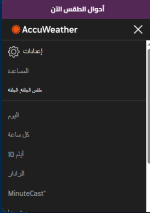
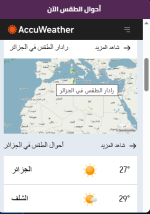
الكود
الحمد لله تعالى تم حل المشكل والان الكود شغال ويعرض توقعات الطقس لحظة بلحظة
صور للمعاينة
الكود
كود:
<!--  زر الطقس مباشر -->
<div id="weatherWidget" style="position:fixed; left:20px; bottom:20px; z-index:9999; text-align:center;">

  <!-- النص فوق الأيقونة -->
  <div style="font-size:14px; font-weight:bold; color:#532855; margin-bottom:6px; text-align:center; white-space:nowrap;">
    حالة الطقس
  </div>

  <!-- زر دائري ثابت -->
  <div id="weatherBtn"
       onclick="toggleWeatherBox()"
       style="width:60px; height:60px; border-radius:50%; background:#532855; color:#fff; display:flex; align-items:center; justify-content:center; cursor:pointer; box-shadow:0 4px 12px rgba(0,0,0,.3); font-size:26px; margin:0 auto;">
       ⛅
  </div>

  <!-- الصندوق المنبثق -->
  <div id="weatherBox" style="display:none; margin-top:10px; width:320px; max-height:70vh; border-radius:10px; overflow:hidden; box-shadow:0 4px 12px rgba(0,0,0,.3); background:#fff;">
      <div style="background:#532855; color:#fff; padding:8px; font-size:14px; text-align:center; font-weight:bold;">
         أحوال الطقس الآن
      </div>
      <iframe src="https://www.accuweather.com/" frameborder="0" style="width:100%; height:500px; border:0;"></iframe>
  </div>

</div>

<script>
function toggleWeatherBox(){
  var box = document.getElementById("weatherBox");
  if(box.style.display === "none"){
    box.style.display = "block";
  } else {
    box.style.display = "none";
  }
}
</script>
التعديل الأخير:
نعم اشتغل الله يعطيك العافيةاسف جدا ساعيد ان شاء الله تعالى صياغة الكود لافضل من ذلك وسارسله حالا @Admin @jassim1
الحمد لله تعالى تم حل المشكل والان الكود شغال ويعرض توقعات الطقس لحظة بلحظة
أبدعت
ما هو انكور؟
هو منتدى عربي تطويري يرتكز على محتويات عديدة لاثراء الانترنت العربي، وتقديم الفائدة لرواد الانترنت بكل ما يحتاجوه لمواقعهم ومنتدياتهم واعمالهم المهنية والدراسية. ستجد لدينا كل ما هو حصري وكل ما هو مفيد ويساعدك على ان تصل الى وجهتك، مجانًا.